LastPass pricing: available plans and which one is most worthwhile
Guide and price comparison of LastPass plans

Summarise with AI
LastPass is one of the most well-known and widely used password managers in the world. It offers several plans designed for different types of users, from individual use to entire families. In this article, we review the prices of LastPass, what each plan includes, and which is the most cost-effective option currently.
Why do you need a paid password manager?
Although there are free options, premium password managers offer crucial advantages for your digital security:
- Synchronization across all your devices: mobile, computer, tablet
- Active monitoring of security breaches: alerts you if any of your passwords have been leaked
- Advanced multifactor authentication: extra protection beyond the master password
- Secure password sharing: without having to send them via WhatsApp or email
- Storage of sensitive documents: encrypted bank cards, personal documents
Investing in a premium password manager can save you from serious security issues, and as you will see later, the actual cost can be very low if you choose wisely.
LastPass Plans and Prices
LastPass offers different plans according to the user's needs. Below, we analyze each one in detail:
LastPass Free
Price: Free
Includes:
Unlimited password storage
Basic browser autofill
Password generator
Secure notes
Important limitations:
Only one type of device: you must choose between using LastPass on mobile OR computer, but not both simultaneously
No password sharing
No security monitoring
No priority support
When does LastPass Free make sense?
This plan can work if:
- You only use one device regularly (only mobile or only computer)
- You have few passwords to manage
- You don't need to share access with anyone
- Your budget is absolutely zero
Reality: The limitation of only one type of device makes this plan obsolete for most current users, who combine mobile, computer, and tablet daily.
LastPass Premium
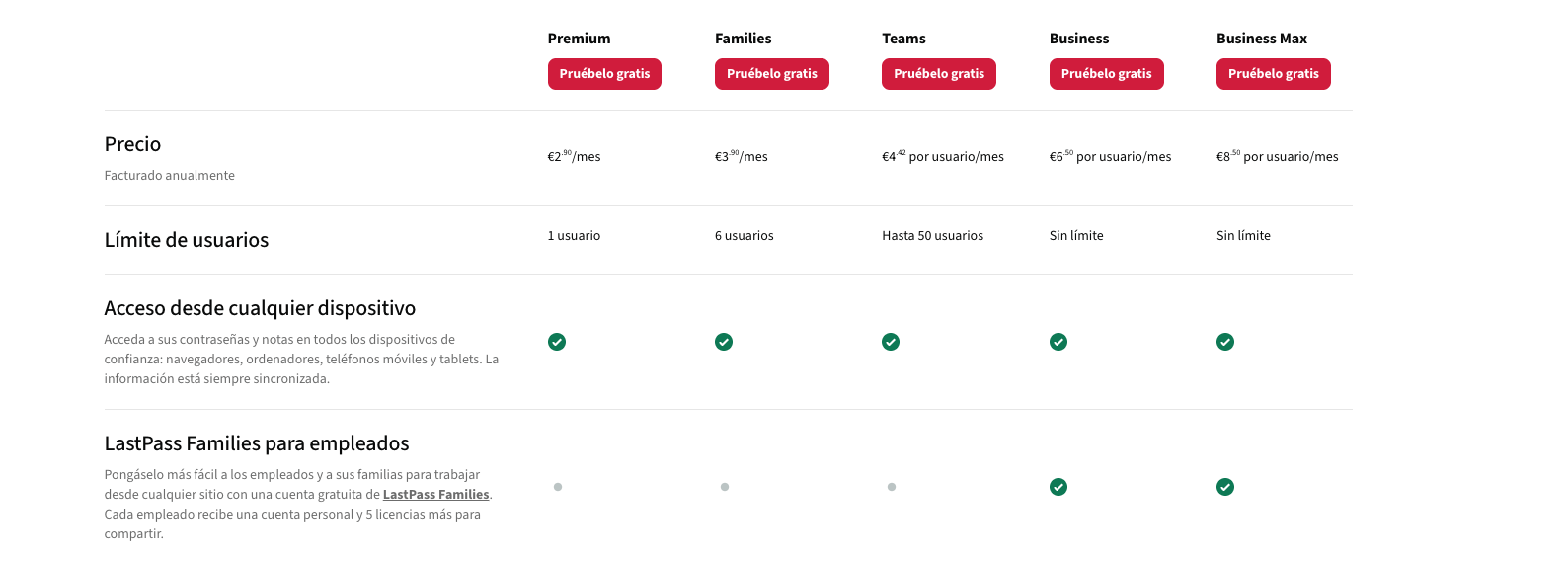
- Price: €2.90 per month (€34.80 per year)
- Includes:
- Unlimited use on all devices: mobile, computer, tablet
- Automatic synchronization between devices
- Share passwords with one user
- Dark Web security monitoring: alerts if your credentials have been compromised
- Emergency access
- Multifactor authentication (MFA)
- 1 GB of encrypted file storage
- Priority technical support
When does LastPass Premium make sense?
This plan is suitable if:
- You are an individual user without the need to share with more people
- You use multiple devices
- You value security monitoring
- You need technical support when problems arise
But beware: although Premium is comprehensive, there is a much more cost-effective option that offers exactly the same and more for less money.
LastPass Families (⭐ Best option)
- Total price: €3.90 per month (€46.80 per year)
- Up to 6 people
- Includes:
- All Premium features for each member (value of €17.40 per month if individual Premiums were contracted)
- Completely private and independent accounts for each user
- Shared folders among family members
- Centralized family administration panel
- Each member has their own master password
- Individual end-to-end encryption
- No limit on passwords shared among members
Why is LastPass Families the best option?
Let's do the math:
Option 1 - Individual LastPass Premium:
- Cost: €2.90 per month
- Features: Complete for 1 person
Option 2 - LastPass Families:
- Total cost: €3.90 per month
- Features: Complete for up to 6 people
- Cost per person if shared: €0.65 per month
The savings are evident: for just €1 more per month than the Premium plan, you get exactly the same features but with capacity for 6 users.
When does LastPass Families make sense?
Always. Even if you think "I don't have a family to share it with," this plan is still the smartest option because:
- You can share it with anyone: partner, roommates, friends, or find a group
- You have exactly the same features as Premium: you lose nothing, only gain
- The price is practically the same: a €1 difference is irrelevant
- Future flexibility: even if you're alone today, tomorrow you might want to share with someone
Is it safe to share LastPass Families?
Absolutely yes. This is crucial to understand:
- Each member has their completely independent account
- Each user sets their own master password that no one else knows
- No one can see other members' passwords unless explicitly shared
- Encryption is individual for each account
- The administrator only manages invitations, does not have access to private vaults
In other words, being in a LastPass Families is like having 6 independent Premium accounts under one bill. The privacy and security of each user are completely guaranteed.
What is the best LastPass option?
When comparing what each plan offers with its price, LastPass Families is clearly the best option, regardless of your personal situation.
Real value comparison:
| Plan | Price/month | Premium Features | Users | Real value per user |
|---|---|---|---|---|
| Free | Free | ❌ | 1 | Limited |
| Premium | €2.90 | ✅ | 1 | €2.90 |
| Families | €3.90 | ✅ | 6 | €0.65 |
Why do we insist so much that Families is the best option?
- Unbeatable value for money: For €1 more you get capacity for 6 people
- Same level of security: Each member enjoys all Premium features
- Total privacy guaranteed: Completely independent individual vaults
- Flexibility: You can add or remove members whenever you want
- Real savings: By dividing the cost, you pay 77% less than with individual Premium
The only "drawback" of the Families plan
You need to find people to share it with. But even this has a simple solution, as we will see below.
How to save by sharing LastPass Families with Sharingful
To make the most of the LastPass Families plan, the easiest way is to share it through Sharingful.
Sharingful is a platform that allows you to share family subscriptions in a secure, legal, and transparent way, organizing groups and payments among users. If you want to see the step-by-step process, you can check out this complete guide on compartir LastPass.
How does Sharingful work?
- Register on the platform
- Join a group of LastPass Families with available spots
- Pay your share: €1.95 every three months (quarterly cost of the plan divided among members)
- Receive the invitation from the group administrator
- Create your private LastPass account and start using it
Advantages of using Sharingful for LastPass:
- You only pay your share of the plan: €1.95 every 3 months (€0.65 per month)
- Already organized groups: you don't have to find people or manage payments
- Spanish platform with secure payments
- No complications: Sharingful manages the group's administration
- Legal and safe: complies with LastPass's terms of service
- Your privacy intact: Sharingful does not have access to your passwords
The real savings with Sharingful:
- Individual LastPass Premium: €2.90 per month = €8.70 every 3 months
- LastPass Families on Sharingful: €1.95 every 3 months
Savings: 77% obtaining exactly the same Premium service.
Conclusion: LastPass Families is the winning option
If you are looking for a complete, secure, and affordable password manager, LastPass Families is indisputably the best option:
- Same Premium service as the individual plan
- Total price barely €1 higher than Premium
- Capacity for 6 users
- Secure sharing without compromising privacy
- Possibility to reduce the cost to just €0.65 per month by sharing it
And if you don't have anyone to share it with, platforms like Sharingful make it as easy as registering and joining an existing group.
It makes no sense to pay €2.90 per month for Premium when for practically the same you can have Families, and even less sense to pay that when you can get the same service for €1.95 every three months through Sharingful.