Howfinal to Cancel Spotify Premium
Cancel Spotify Premiumfinal? Before you cancel, discover how to pay only €3.50/month by sharing the Family plan. Complete cancellation guide and money-saving alternatives.


Summarize with AI
Are you thinking about canceling Spotify Premium because the price has become too high? Before canceling your subscription, there's an alternative you should consider: instead of paying €11.99/month for the individual plan, you could access the same Premium features for just €3.50/month by sharing the family plan.
Save up to 70% before canceling: Share Spotify with Sharingful
If your main reason for canceling Spotify Premium is the monthly cost, there is a much more economical solution that maintains all the benefits of your current Premium account.
How much does Spotify really cost?
- Individual Premium Plan: €11.99/month
- Family Plan (up to 6 accounts): €20.99/month
- Price per person sharing: €3.50/month
By compartiendo el plan familiar with Sharingful, you pay only €3.50/month instead of €11.99, saving €8.49 each month (more than €100 a year) while maintaining:
- Lossless audio (FLAC)
- Unlimited offline downloads
- No ads
- Unlimited skips
- Your own personalized profile
- Your playlists and favorites
- Discover Weekly and all personalized recommendations
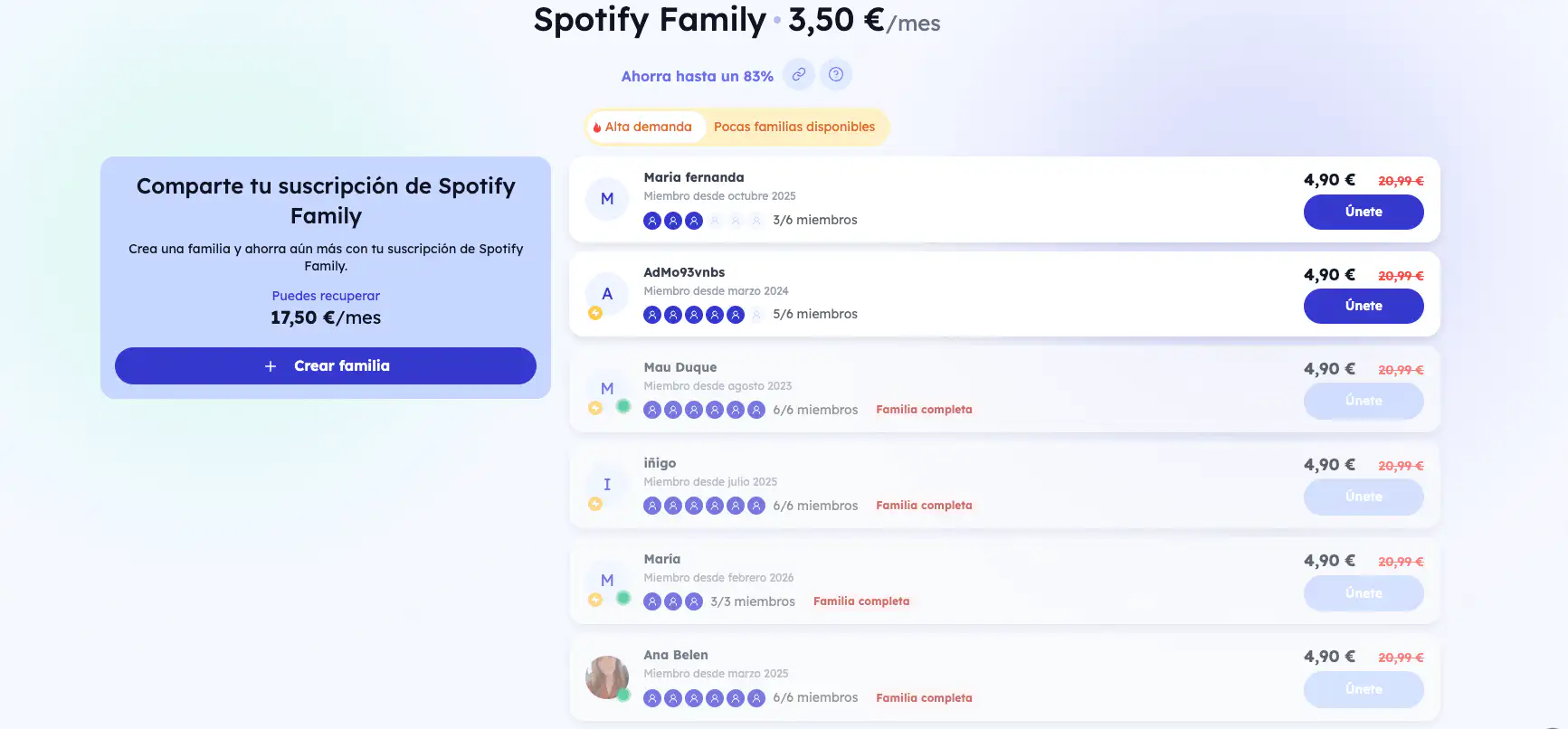
How does Sharingful work?
Sharingful is a Spanish platform (4.9/5 on Trustpilot) that facilitates legally sharing digital subscriptions:
- Connects users who want to share the Spotify family plan
- Manages payments automatically each month
- Renews your access without you having to do anything
- Protects your data under European GDPR regulations
Advantages of sharing with Sharingful:
- Save €8.49/month (€101.88/year)
- 100% independent profile from other members
- Automatic hassle-free management
- Spanish support 7 days a week
- Cancel anytime without penalties
- 100% legal using official family plans
More than 50,000 users are already saving with Sharingful on Spotify, Netflix, Disney+, HBO Max, and over 30 digital platforms.
Still want to cancel? Step-by-step guide
If after considering the savings you still prefer to cancel your Spotify Premium subscription, here's how to do it according to your payment method.
Cancel Spotify from the web (universal method)
This method works for most Spotify subscriptions:
- Open your browser and go to spotify.com
- Log in with your account
- Click on your username (top right corner)
- Select "Account" from the dropdown menu
- In the "Your plan" section, click on "Change plan"
- Scroll down and select "Cancel Premium"
- Follow the instructions and confirm the cancellation
- You will receive a confirmation email
Important: You will still have Premium access until the end of your current billing period.
Cancel Spotify Premium from iPhone or iPad
If you subscribed through the App Store:
- Open the "Settings" app on your iPhone/iPad
- Tap your name at the top
- Select "Subscriptions"
- Find and tap "Spotify"
- Tap "Cancel Subscription"
- Confirm the cancellation
Alternatively:
- Open the App Store
- Tap your profile picture (top right corner)
- Select "Subscriptions"
- Find Spotify and tap "Cancel Subscription"
Cancel Spotify Premium from Android
If you subscribed through Google Play:
- Open the Google Play Store app
- Tap the menu icon (three horizontal lines)
- Select "Subscriptions"
- Find and tap "Spotify"
- Tap "Cancel Subscription"
- Follow the instructions and confirm
Cancel Spotify Premium paid with PayPal
If you pay your subscription with PayPal:
- Log in to your PayPal account
- Go to "Settings" (gear icon)
- Select "Payments"
- Click on "Manage automatic payments"
- Find "Spotify" in the list
- Click on Spotify and select "Cancel"
- Confirm the cancellation
Cancel Spotify Premium paid with card
If you pay directly with a credit/debit card, use the web method described at the beginning (cancel from spotify.com).
Cancel Spotify Family (if you are the administrator)
If you manage a Family plan:
- Go to spotify.com/family
- Log in as the administrator
- Go to "Account settings"
- Select "Change or cancel"
- Choose "Cancel Premium"
- Confirm the cancellation
Note: All your family members will lose Premium access at the end of the billing period.
Cancel Spotify Student
If you have the student plan:
- Log in to your account on spotify.com
- Go to "Your plan" in account settings
- Select "Cancel Premium"
- Confirm the cancellation
The process is identical to the individual plan, but you will lose the student discount if you unsubscribe.
What happens after canceling Spotify Premium?
Once you cancel your subscription:
Immediately:
- Your subscription is marked as canceled
- You receive a confirmation email
Until the end of the billing period:
- You maintain full Premium access
- All features continue to work normally
- You can continue using offline downloads
After the billing period:
- You automatically revert to Spotify Free
- You lose access to offline downloads
- Ads appear between songs
- Limited skips (6 per hour on mobile)
- No high-quality audio
- Your playlists and favorites are preserved
Alternatives to canceling Spotify Premium
Before canceling permanently, consider these options:
1. Share with Sharingful (€3.50/month)
The most economical option to keep Premium without paying €11.99/month. Discover how to save by sharing Spotify legally and safely.
2. Duo Plan (€14.99/month for 2 people)
If you live with someone else who uses Spotify, the Duo plan costs €7.50/person.
3. Own Family Plan (€20.99/month for up to 6)
If you have friends or family interested, organizing your own family plan reduces the cost to €3.50/person.
4. Student Plan (€5.99/month)
If you are a university student, you can access Premium with a 50% discount.
5. Temporary promotions
Spotify often offers 3-month promotions at a reduced price. Check if you have any available in your account.
Frequently asked questions about canceling Spotify
Will I lose my playlists when I cancel?
No. All your playlists, saved songs, and favorite podcasts remain in your account. You will simply revert to Spotify Free with ads.
Can I resubscribe after canceling?
Yes, you can reactivate Premium at any time. All your settings and lists will be as you left them.
Will I get a refund if I cancel before the month ends?
No. Spotify does not offer prorated refunds. You will continue to have Premium access until the end of your current billing period.
Can I cancel at any time?
Yes, there is no commitment. You can cancel whenever you want without penalties.
What happens to my offline downloads?
Downloaded songs will stop working when your Premium subscription expires. You will need to be online to listen to music.
Do I keep Spotify Wrapped after canceling?
Yes, your annual Wrapped remains available in your account, even if you don't have Premium.
Can I pause my subscription instead of canceling?
No, Spotify does not offer a pause option. You can only cancel and resubscribe whenever you want.