Bitwarden Pricing and Plans
Complete Bitwarden pricing guide: what each plan includes and what it really costs. With Sharingful, you can access the Families plan for just €2/month.


Summarize with AI
Bitwarden Pricing
Managing passwords has become a basic necessity for digital survival. Among dozens of available options, Bitwarden stands out as an alternative that combines robust security with affordable prices. But here's the issue: most analyses on Bitwarden pricing are limited to copying tables from the official website without explaining which plan truly deserves your money.
The question isn't whether Bitwarden is worth it, but which plan fits your specific situation. A freelancer managing five accounts has completely different needs than a company with fifty employees. And here's the key: understanding Bitwarden pricing requires first understanding what problem you're trying to solve.
General Structure of Bitwarden Pricing
Bitwarden organizes its plans into two main categories: personal use and business use. This division is not arbitrary. It responds to fundamentally different needs in terms of administration, control, and collaborative functionalities.
The pricing model follows a tiered logic. You start with basic free features and add capabilities as you need them. You don't pay for features you'll never use, something I can't say for many competitors who force you to purchase bloated packages.
Advantages of the Open Source Model
Bitwarden is open source, and this has direct implications on its pricing. By allowing any developer to audit its code, it reduces external security verification costs. These savings are passed on to the end user.
Open source also means you can self-host Bitwarden on your own server. For organizations with strict compliance requirements, this eliminates the need to pay for expensive enterprise plans just to have control over where the data resides. A server in Frankfurt or Madrid can run your Bitwarden instance without additional licensing costs.
The transparency of the code generates trust. You don't need to believe marketing promises about encryption: any expert can verify that your passwords are truly protected with AES-256.
Differences Between Personal and Business Plans
Personal plans are designed for individuals and families. They cover unlimited password storage, synchronization across devices, and secure password generation. The focus is on the convenience of the individual user.
Business plans add layers of administration. We're talking about centralized security policies, integration with corporate directories, audit reports, and user management. An IT administrator can enforce master password requirements, enable mandatory two-factor authentication, and instantly revoke access when an employee leaves the company.
The price difference reflects this administrative complexity. You don't just pay for more users, but for tools that simplify management at scale.
Personal Plans: From Free Version to Premium
Bitwarden's personal ecosystem offers three clearly differentiated levels. Each one caters to a specific user profile, and choosing poorly can mean paying for unnecessary features or falling short on security.
Features of the Unlimited Free Plan
Bitwarden's free plan breaks industry conventions. While competitors like LastPass limit device synchronization in their free versions, Bitwarden allows unlimited password storage and synchronization across all your devices at no cost.
It includes a password generator, autofill in browsers and mobile apps, and secure notes for sensitive information. For the average user who simply wants to stop using the same password everywhere, the free plan covers all basic needs.
The main limitation is in two-factor authentication. The free plan only supports authenticator apps and email. If you need physical security keys like YubiKey, you'll need to upgrade.
Bitwarden Premium: Advanced Security Features
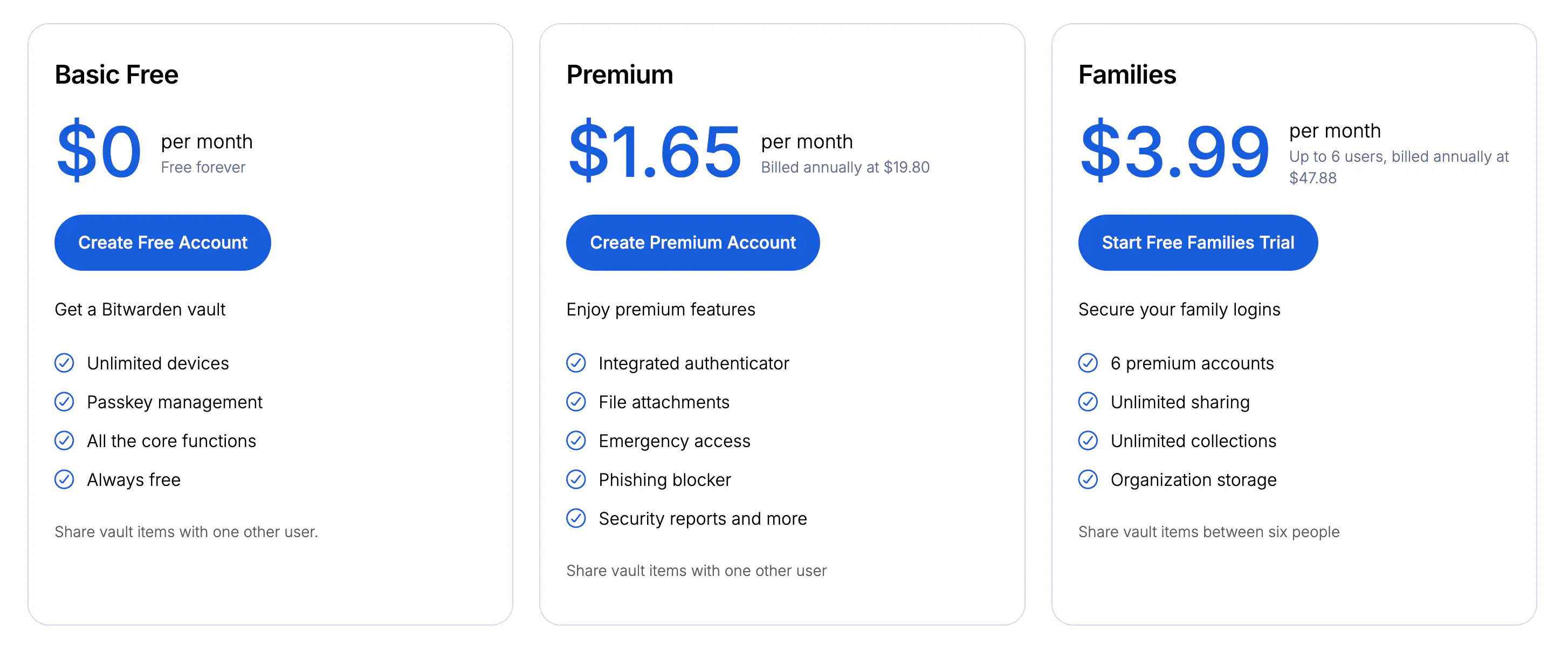
The Premium plan costs approximately $1.52/month or $18.24 annually. This price makes it one of the most affordable premium managers on the market.
What do you get for less than $20 a year? Advanced two-factor authentication with support for YubiKey, FIDO2, and Duo. Vault health reports that identify weak, reused, or compromised passwords in data breaches. Emergency access that allows a trusted contact to access your vault if something happens to you. It also includes 1 GB of encrypted storage for attachments, where you can store sensitive documents like passport copies or contracts directly in your vault.
Family Plan: Secure Password Sharing
The Bitwarden Families plan is available for up to 6 users at approximately $3.68/month billed annually (about $44/year). Divided among six people, we're talking about less than $7.50 per person per year.
The standout feature is shared collections. Imagine sharing Netflix credentials with your partner: instead of sending the password via WhatsApp every time you change it, both of you access the same updated entry. It's like lending a book versus giving a copy of the house keys: you maintain control while sharing access.
Each family member also gets all individual Premium features. It's the best value plan if you live with others who also need to manage passwords. And if you want to reduce the cost even further, through Sharingful you can share the Bitwarden Families plan and pay only $2.00/month per person.
Solutions for Businesses and Professional Teams
Business needs go beyond simple password storage. They require administrative control, regulatory compliance, and scalability. Bitwarden offers two plans specifically designed for these scenarios.
Teams Plan: Collaboration for Small Organizations
The Teams plan starts at approximately $3.68/month per user. It's designed for small teams that need to share credentials securely without the complexity of a full enterprise implementation.
It includes unlimited collections to organize credentials by project, department, or client. A design studio can have separate collections for each client, ensuring designers only access credentials relevant to their work.
The admin panel allows user management, event log viewing, and basic security policy configuration. For a ten-person startup, it covers all needs without requiring a dedicated IT department.
Enterprise Plan: Total Control and Custom Policies
At approximately $5.52/month per user, the Enterprise plan adds critical capabilities for organizations with strict security requirements.
Integration with LDAP directories and Azure Active Directory automates user provisioning. When someone joins the company, they automatically gain access to the credentials they need. When they leave, their access is revoked without manual intervention.
Custom security policies allow enforcing specific requirements: minimum master password length, mandatory two-factor authentication, data export restrictions. For regulated sectors like banking or healthcare, these features are not optional.
The plan also includes single sign-on via SAML 2.0, integrating Bitwarden with the company's existing authentication ecosystem.
Additional Costs and Complementary Services
Beyond the base plans, Bitwarden offers specialized services that can increase the total cost. Understanding these extras avoids surprises on the bill.
Secrets Manager: Pricing for Developers
Bitwarden Secrets Manager is a separate product aimed at development teams. It manages infrastructure secrets like API keys, access tokens, and certificates.
Pricing starts at approximately $5.52/month per user for teams, with volume discounts for large organizations. For the individual developer, there is a limited free version that allows experimenting with the tool.
The difference with the traditional password manager is the focus. Secrets Manager is designed to integrate with CI/CD pipelines, Docker containers, and cloud services. If your team deploys code regularly, this service can eliminate the dangerous practice of hardcoding credentials.
Extra Attachment Storage
The Premium plan includes 1 GB of encrypted storage, but some organizations need more. Bitwarden offers additional storage for an extra cost, although for most users the base limit is more than sufficient.
Before paying for additional storage, consider if you really need to store large documents in your password manager. For bulky files, specialized encrypted storage services may be more appropriate.
Value Comparison: Bitwarden vs. Competitors
Putting Bitwarden prices in context requires comparing them with popular alternatives. 1Password charges approximately $33 annually for its individual plan, almost double that of Bitwarden Premium. Dashlane exceeds $46 annually for similar features.
The difference amplifies in family and business plans. Where Bitwarden charges about $44 annually for six family users, premium competitors can exceed $65 for the same number of licenses.
The open-source factor also weighs in. With Bitwarden, you know exactly what the software does with your data. Proprietary competitors require you to trust their promises without the possibility of independent verification.
How to Choose the Right Bitwarden Plan for Your Needs
The choice depends on three factors: number of users, security requirements, and available budget.
If you're an individual user without special authentication needs, the free plan is sufficient. There's no reason to pay for features you won't use.
For security-conscious users who want physical keys, health reports, and file storage, Premium at less than $20 annually is a minimal investment with significant return.
Families and cohabitants should directly consider the Bitwarden Family plan. At less than $7.50 per person per year, the cost is insignificant compared to the convenience of securely sharing credentials. And if you want to reduce it even further, on Sharingful you can access it for only $2.00/month per person.
Small businesses will find in Teams the balance between functionality and simplicity. Organizations with compliance requirements will need Enterprise for directory integrations and custom policies.
My recommendation: start with the free plan. Use it for a month and evaluate if the limitations really affect you. Upgrading is instant, but downgrading after getting used to premium features is frustrating.