Securely Share a Password Manager: Complete Guide for 2026
Sharing your password manager subscription isn’t the same as sharing your passwords—and that difference changes everything.

Summarize with AI
The word "passwords" has the power to make people nervous. And rightly so: they are the key to your bank, your email, your social networks, and practically everything important in your digital life. So when someone mentions "sharing a password manager," the natural reaction is to back off.
But wait. Sharing a subscription to a password manager is not the same as sharing your passwords. They are two completely different things, and understanding that difference is exactly what you need to save money without compromising your security one bit.
In this guide, we explain how the family plans of the three major managers —1Password, Bitwarden, and LastPass— work, why they are secure, and how you can minimize costs using Sharingful.
Why do you need a password manager in 2026?
If you still use the same password for multiple accounts, or have a Word file with your keys, this year is the time to change. In 2026, credential attacks are the most common entry vector in cyberattacks on both individuals and companies. Massive data leaks expose millions of passwords every month, and attackers test those combinations on other services automatically within hours.
A password manager solves the problem at its root: it generates unique and complex passwords for each service, stores them encrypted, and fills them in automatically. You only have to remember one master password. The software does the rest.
The problem is the price. A quality individual plan costs between 20 and 50 euros per year, and if there are several people at home who need protection, that figure multiplies. Family plans exist precisely to solve this, and sharing them is completely legal and safe if you know how they work.
Is it safe to share the subscription? Debunking the fear
The most common confusion is this: people believe that sharing a family plan means that other members can see their passwords. It doesn't work that way in any serious manager.
When you join a family plan of 1Password, Bitwarden, or LastPass, you receive your own private vault, completely encrypted and accessible only with your master password. No one else —neither the other group members, nor the administrator, nor the company itself— can access what you store there.
What is shared is the payment of the subscription and, optionally, an additional shared vault where the administrator can put credentials that the group wants to have in common (the home WiFi password, access to a family streaming account, etc.). But that is your decision, not something automatic.
In summary: you share the cost, not your passwords.
How family plans work: separate vaults without cross-access
The three managers we analyzed share the same security architecture in their family plans:
Private personal vault for each member. End-to-end encrypted with your own master password. Not even the group administrator can see its content.
Optional shared vault where common credentials can be stored. It only contains what the administrator explicitly decides to put there.
Zero-knowledge encryption in all three cases: the company does not have access to your data. Your passwords are encrypted on your device before being sent to their servers.
Emergency access: most plans allow you to designate a trusted contact who can request access to your vault in case of emergency, with a configurable waiting period.
This design is the same used by large companies to manage team passwords. The only difference is the price, which in family plans is optimized for groups of up to six people.
Comparison: 1Password vs Bitwarden vs LastPass Families
The three plans in detail
1Password Families — from $5.99/month (~€69/year after the March 2026 price increase)
Up to 5 members. Private vaults for each user plus unlimited shared vaults. Includes Travel Mode (hides sensitive vaults when crossing borders), Watchtower (leak monitoring), 1 GB of encrypted storage per person, and 24/7 support. It is the most visually polished and the favorite of users who prioritize user experience over price. It does not have a free plan.
Bitwarden Families — $3.99/month (~$47.88/year)
Up to 6 members, each with all Premium features. Open source audited by third parties, meaning the security community can verify that the encryption works as promised. Includes shared collections, 1 GB of personal storage and 1 GB of organizational storage, vault health reports, integrated TOTP, and support for YubiKey physical keys. It has a functional free plan for a single user. It is the most transparent option in terms of security.
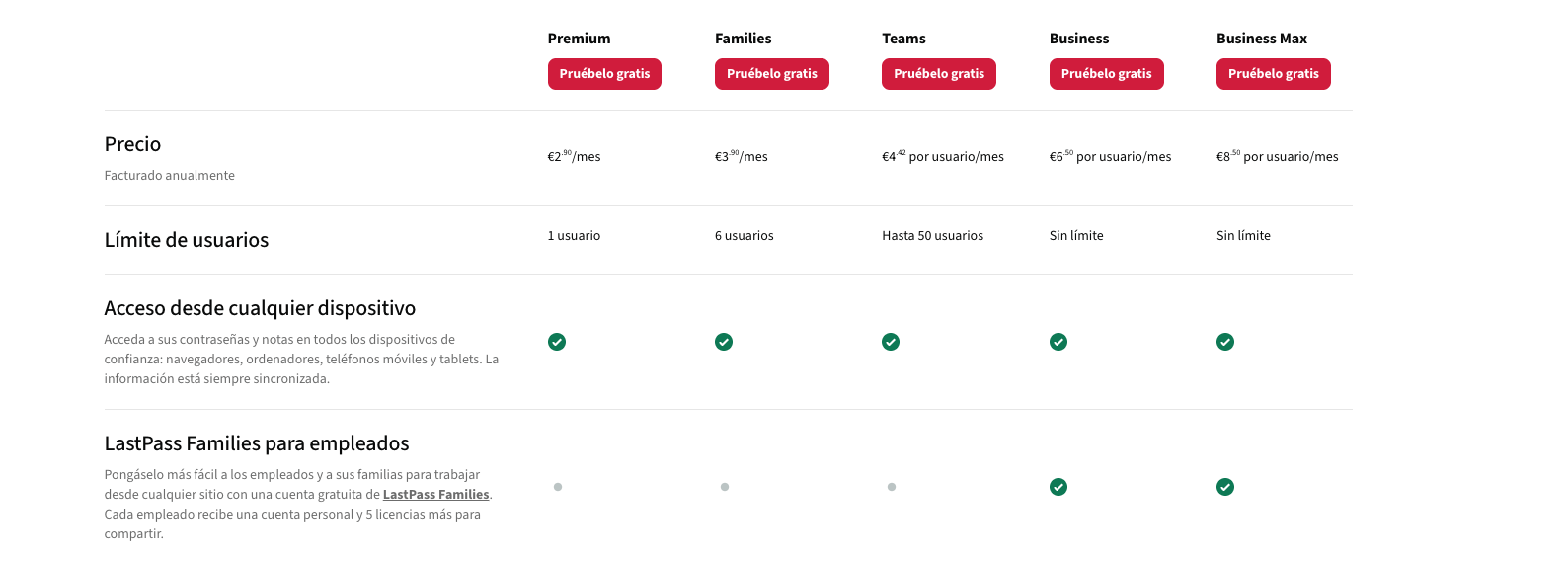
LastPass Families — $4/month (~$48/year)
Up to 6 members, each with all Premium features. Unlimited shared folders, admin panel to manage members, Dark Web monitoring, and emergency access. It is the most popularly known, although it carries the reputation of the 2022 security breach. Since then, it has significantly strengthened its infrastructure and encryption.
Comparative table
| 1Password Families | Bitwarden Families | LastPass Families | |
|---|---|---|---|
| Price | ~$5.99/month (~€69/year) | $3.99/month (~€47/year) | $4/month (~€48/year) |
| Users | Up to 5 | Up to 6 | Up to 6 |
| Private vault per user | ✅ | ✅ | ✅ |
| Shared vaults/folders | ✅ Unlimited | ✅ Unlimited | ✅ Unlimited |
| Open source | ❌ | ✅ | ❌ |
| Free plan available | ❌ | ✅ | ✅ (limited) |
| Dark Web monitoring | ✅ Watchtower | ✅ | ✅ |
| Encrypted storage | 1 GB/user | 1 GB personal + 1 GB org. | 1 GB |
| Travel mode | ✅ | ❌ | ❌ |
| Emergency access | ✅ | ✅ | ✅ |
| Price on Sharingful | €1.17/month | €2/quarter | €1.95/quarter |
Which one to choose?
Choose 1Password if you value user experience above all, use multiple operating systems, and want the most advanced features (travel mode, passkey integration, more intuitive interface). The higher price is offset if shared.
Choose Bitwarden if you care about security transparency, have some technical profile, or simply prefer not to pay more than necessary. It offers the best objective value for money.
Choose LastPass if you already know it, or if you are looking for the most popular option with the lowest learning curve. Its security history is a point to consider, but the improvements since 2022 are substantial.
How much you save by sharing with Sharingful
Paying for a full family plan by yourself makes no economic sense. These plans are designed for up to five or six people, and the price per person drops drastically when shared.
Sharingful connects people who want to share digital subscriptions in an organized, secure way without the logistical problems of managing payments among acquaintances. The prices per person are as follows:
| Individual price | With Sharingful | Annual savings | |
|---|---|---|---|
| 1Password Families | ~€13.80/person/year | €1.17/month (€14/year) | ~€0 net, but with full family plan |
| Bitwarden Families | ~€7.90/person/year | €2/quarter (€8/year) | Similar to the price per person, with management included |
| LastPass Families | ~€8/person/year | €1.95/quarter (€7.80/year) | Full Premium access for less than the individual plan |
The real advantage is not just the price: you get access to all the Premium features of the family plan —including those not in the basic individual plan— paying less than a standard individual subscription, and without having to manage the group yourself.
Steps to start today
If you want a serious password manager without paying the full price of a family plan, the process is simple:
1. Choose the manager. Use the comparative table above. If you don't know where to start, Bitwarden is the safest option in terms of price-quality-transparency.
2. Enter Sharingful. Look for the plan you have chosen —1Password Families, Bitwarden Families, or LastPass Families— and join an existing group or create a new one.
3. Accept the invitation. The group administrator will send you an invitation email from the manager's platform. Accept it, create your own account (or link the one you already have), and you're done.
4. Set up your private vault. From that moment, your vault is yours and yours alone. Start importing passwords, activate autofill, and forget about remembering anything.
The entire process takes less than ten minutes, and payments are automatically managed every quarter through Sharingful.